

InnoX
Automated
INCIDENT ESCALATION AND NOTIFICATIONS

Automated Incident Escalation & Multi-Channel Notifications

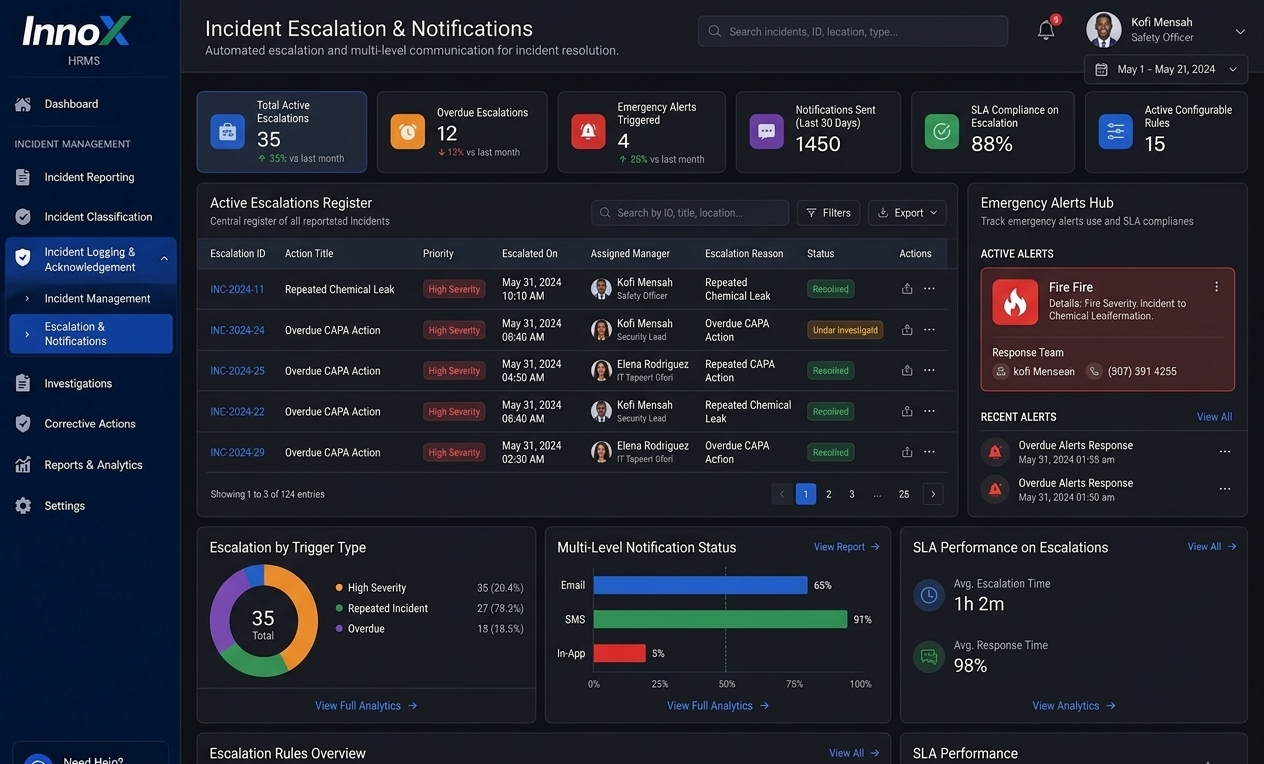
Ensure critical information reaches the right people at the right time. Our intelligent escalation engine automatically routes incident reports to supervisors, safety officers, or executive management based on the event's classification and severity. By leveraging real-time alerts via Email, SMS, and in-app notifications, InnoX eliminates communication delays, enforces organizational accountability, and ensures that high-risk incidents are prioritized for immediate response and resolution.

Eliminate Response Gaps with Intelligent Automation

Transform how your organization reacts to critical events by replacing manual chains of command with automated intelligence. By ensuring that incidents are instantly escalated to the right decision-makers, you reduce the risk of oversight and minimize the time between a report being filed and a solution being implemented. This streamlined communication flow not only speeds up emergency responses but also strengthens organizational accountability by creating a transparent record of every notification sent.

Reduced Response Latency

Automatically bypass manual delays by pushing alerts directly to the relevant mobile devices and desktops the moment an incident is logged.

Performance illustration
Escalation Controls

Escalation Controls

Automatically escalate incidents based on severity, urgency, or unresolved timelines. This section helps ensure serious issues receive immediate attention.

  • Escalation Rules
  • Severity Escalation
  • Repeat Incident Escalation
  • Overdue Escalation
Notification Channels

Notification Channels

Send alerts through multiple communication channels to keep stakeholders informed. This section improves awareness and speeds up incident response.

  • Email Alerts
  • SMS Alerts
  • In-App Notifications
  • Stakeholder Broadcasts

Discover More with InnoX

Enable fast, accurate, and consistent incident reporting across your organization. This submodule allows users to capture incidents in real time with detailed information, classify them using predefined categories and severity levels, and automatically notify the right stakeholders for immediate action. By standardizing how incidents are reported and categorized, it ensures better visibility, quicker response, and a strong foundation for effective investigation and resolution.

Stage-Based Alerts

Stage-Based Alerts

Trigger notifications at every major stage of the incident lifecycle. This section keeps all relevant parties updated from reporting to closure.

  • Reporting Alerts
  • Investigation Alerts
  • RCA Approval Alerts
  • Closure Alerts
Capabilities

Incident Escalation & Notifications

Ensure no incident is ignored automate alerts, escalate delays, and trigger emergency responses instantly.

Escalation Rules

Configurable rules auto-escalate high-severity, repeated, or overdue incidents to senior management.

Multi-Level Notifications

Send email, SMS, or in-app alerts at every stage: reporting, investigation, CAPA, RCA approval, and closure.

Emergency Alerts

Trigger immediate alerts and activate response teams for fires, serious injuries, major disruptions, or security threats.

Custom Recipient Groups

Define notification groups (safety team, IT, facilities, executives) based on incident type or severity.

Time-Based Escalation

Escalate automatically if no action is taken within a set timeframe (e.g., 1 hour, 24 hours).

Acknowledgment Tracking

Require recipients to acknowledge alerts; escalate further if unacknowledged.

Silent Hours Configuration

Set quiet periods for non-critical alerts while allowing emergency bypass.

Notification Audit Log

Maintain a complete record of who was notified, when, and how for compliance reporting.

Multi-Platform

Responsive For Both Desktop and Mobile

Access your incident escalation and notifications from anywhere, on any device. Our platform adapts seamlessly to desktop, tablet, and mobile screens.

Desktop Website Preview
Mobile Website Preview

Frequently asked questions

Explore answers to the most common questions from our trusted partners and clients.

Configurable triggers include high severity, overdue incident aging past SLA, repeated incidents in same location, or unresolved CAPA.

Experience the Difference for Yourself!

  • Explore all features and decide if it’s right for you
  • Upgrade your workflow and launch faster than before
  • Join our community and start learning as you build
InnoX
Innorik
Enterprise
Two people moving forward together through a sunlit park