



InnoX
Structured
INCIDENT LOGGING AND ACKNOWLEDGEMENT

Structured Incident Logging & Real-Time Acknowledgement

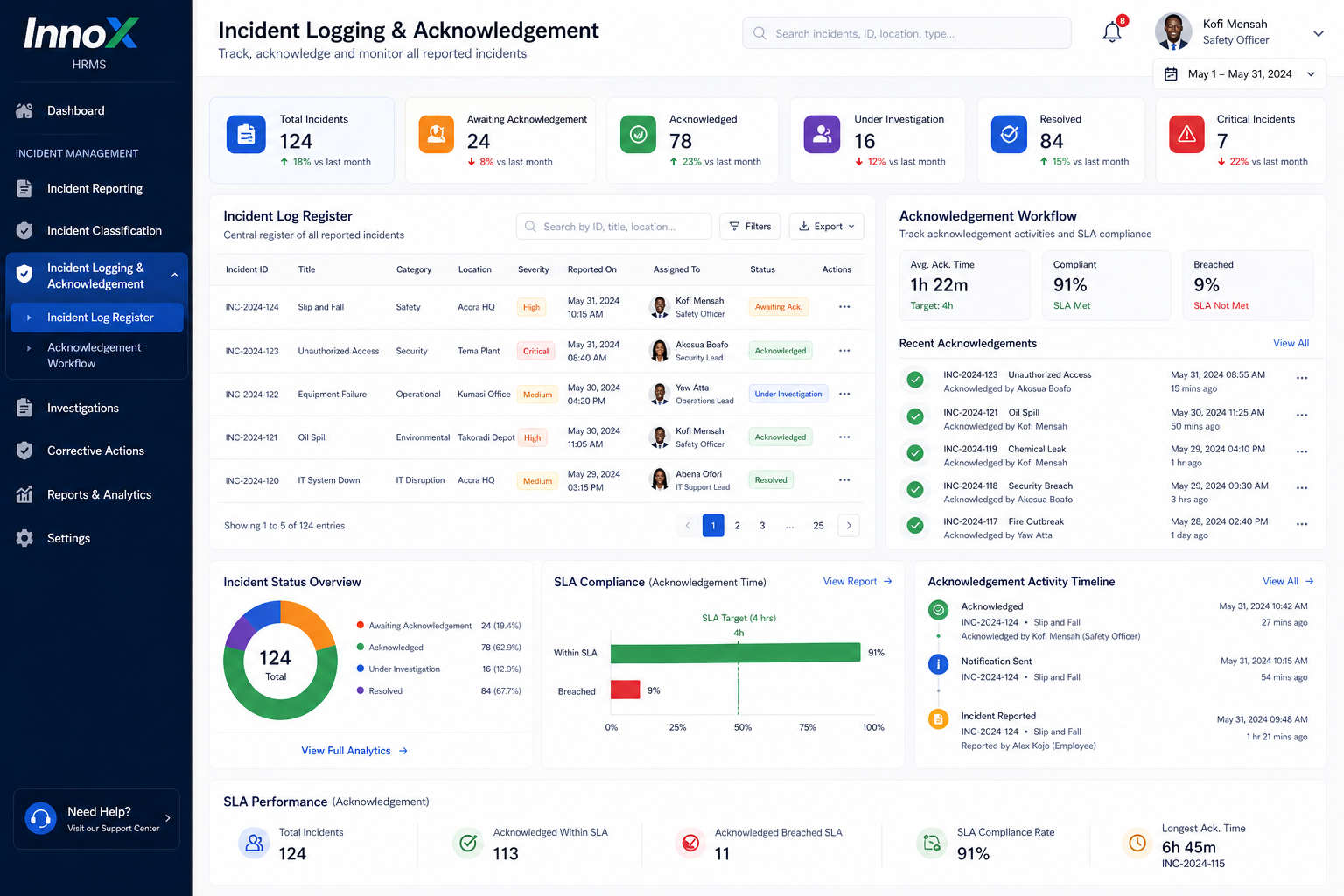
Establish a single, auditable version of the truth for every event in your organization. Our centralized register enables authorized users to log, search, and filter incidents while ensuring that every report is instantly acknowledged by the right supervisors, safety officers, or security teams. By digitizing the acknowledgement workflow, you eliminate communication gaps and ensure that critical issues are moved from "reported" to "under investigation" with full accountability and time-stamped precision.

Drive Resolution Through Real-Time Accountability

Eliminate the uncertainty of manual reporting by digitizing the bridge between logging an incident and initiating a response. By streamlining the acknowledgement process, your organization ensures that every report is instantly visible to the right stakeholders, reducing response times and creating a verifiable audit trail that improves overall safety and operational compliance.

Instant Stakeholder Awareness

Automatically notify safety officers, supervisors, and department heads the moment a log is created, ensuring no incident goes unnoticed.

Performance illustration
Incident Register

Incident Register

Maintain a centralized log of all reported incidents for easy tracking and historical reference. This section gives teams a complete record of every case entered into the system.

  • Incident Log List
  • Search & Filter
  • Case Reference Number
  • Logged Timeline
Status Tracking

Status Tracking

Monitor the progress of incidents from the moment they are reported until they are resolved. This section improves visibility into case ownership and response status.

  • Open Incidents
  • Pending Cases
  • Assigned Officers
  • Severity Status

Discover More with InnoX

Enable fast, accurate, and consistent incident reporting across your organization. This submodule allows users to capture incidents in real time with detailed information, classify them using predefined categories and severity levels, and automatically notify the right stakeholders for immediate action. By standardizing how incidents are reported and categorized, it ensures better visibility, quicker response, and a strong foundation for effective investigation and resolution.

Acknowledgement Workflow

Acknowledgement Workflow

Track when assigned personnel officially acknowledge responsibility for an incident. This section helps ensure that every reported case receives attention within the expected timeframe.

  • Officer Acknowledgement
  • Response Timestamp
  • SLA Monitoring
  • Ownership Confirmation
Audit Visibility

Audit Visibility

Provide a transparent history of every action taken on an incident case. This section supports accountability, traceability, and operational review.

  • Action History
  • Review Trail
  • Status Updates
  • Case Progression
Capabilities

Incident Logging & Acknowledgement

Maintain a transparent, searchable record of every incident and track response accountability in real time.

Incident Log Register

All incidents stored in one searchable, filterable register with status, severity, and timestamps.

Status Tracking

View current status (reported, acknowledged, investigating, resolved, closed) for each incident.

Assigned Officers

See who is responsible for each incident at a glance.

Action Timestamps

Every action is logged with date and time for full audit trails.

Formal Acknowledgement

Assigned officers acknowledge responsibility, with system-recorded timestamps.

SLA Response Tracking

Monitor responsiveness and adherence to service level timelines.

Role-Based Access

Authorized users only; control who can view or edit the incident log.

Search & Filter

Quickly find incidents by type, date, location, severity, status, or assigned officer.

Multi-Platform

Responsive For Both Desktop and Mobile

Access your incident logging and acknowledgement from anywhere, on any device. Our platform adapts seamlessly to desktop, tablet, and mobile screens.

Desktop Website Preview
Mobile Website Preview

Frequently asked questions

Explore answers to the most common questions from our trusted partners and clients.

Retention periods are configurable, but typical defaults range from 3 to 7 years to meet compliance and audit requirements.

Experience the Difference for Yourself!

  • Explore all features and decide if it’s right for you
  • Upgrade your workflow and launch faster than before
  • Join our community and start learning as you build
InnoX
Innorik
Enterprise
Two people moving forward together through a sunlit park