

InnoX
Any Device
BIOMETRIC INTEGRATION

Any Device. Any Location. Real-Time.

Single integration layer for all biometric devices; real-time sync of clock-in/out, shifts, attendance; built-in validation catches errors before HR/payroll; compatible with major brands; zero manual reporting, total accuracy.

Accurate Attendance. Automated Payroll. Zero Manual Effort.

Manual attendance tracking creates delays, errors, and payroll disputes. This sub-module eliminates those problems entirely. Real-time synchronization between your biometric devices and HRMS means attendance logs, shift patterns, and clock-in/out records flow automatically , no spreadsheets, no manual entry. Multi-brand compatibility gives you freedom to choose any device. Built-in validation catches incomplete or invalid records before they impact payroll. The result is accurate workforce tracking, error-free payroll calculations, and HR teams freed from tedious data entry.

Eliminate Payroll Errors Caused by Manual Attendance Entry

Biometric devices sync directly to HRMS in real time , no manual data entry, no spreadsheet transfers, no transcription errors. Attendance logs, shift patterns, and clock-in/out records update automatically across all locations. Payroll calculates from accurate, verified data every cycle. Stop chasing missing punches. Stop correcting payroll mistakes. Start paying employees correctly, on time, every time.

Performance illustration
Real-Time Data Synchronization

Real-Time Data Synchronization

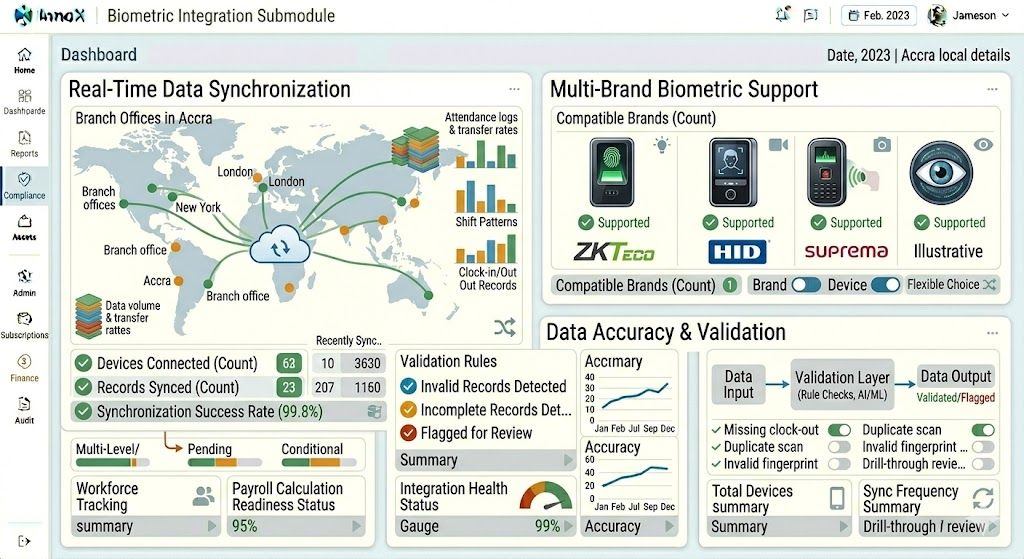
The system connects to multiple biometric devices across locations, continuously updating employee attendance, shift patterns, and clock-in/out records in real-time. This eliminates delays or errors caused by manual reporting, spreadsheet transfers, or batch uploads. What happens at the device appears in your HRMS instantly , ready for payroll, attendance tracking, and workforce analytics.

  • Multi-location connectivity : Connect devices across corporate HQ, remote sites, warehouses, and field offices into one central system
  • Shift pattern synchronization : Employee shift assignments and clock-in rules update automatically across all connected devices
  • Instant data flow : Attendance logs sync from device to HRMS in real time, no waiting for manual uploads

Multi-Brand Biometric Support

Multi-Brand Biometric Support

The system is compatible with all major biometric brands and devices, including fingerprint scanners, facial recognition devices, and iris scanners. This allows organizations complete flexibility in device choice without compatibility concerns. No vendor lock-in. No expensive hardware replacements. Use what you have. Add what you need.

  • Universal device compatibility : Works with fingerprint scanners, facial recognition, iris scanners from all major manufacturers
  • No vendor lock-in : Freedom to choose the best device for each location without worrying about HRMS compatibility
  • Mix and match : Deploy different brands across different sites; all data flows seamlessly to one central HRMS

Discover More with InnoX

Stop manual data entry and disconnected systems. The InnoX Integration Module seamlessly connects your HRMS with biometric devices (fingerprint, facial, iris), ERPs (SAP, Oracle, Dynamics, Odoo), accounting tools, and custom applications. Real-time attendance sync. Automated payroll journals. Secure RESTful APIs. Bulk import/export tools. Your entire enterprise unified.

Data Accuracy & Validation

Data Accuracy & Validation

The system validates the data received from biometric devices, ensuring that incomplete or invalid records are flagged before they affect payroll or HR reports. Missing clock-outs, corrupted scans, unrecognized employee IDs, and other exceptions are identified in real time, allowing HR teams to correct issues at the source rather than discovering them during payroll processing.

  • Automatic data validation : Incomplete or invalid records flagged before they reach payroll or HR reports
  • Exception alerts : Real-time notifications for missing clock-outs, corrupted scans, or unrecognized employee IDs
  • Clean payroll data : Only verified, complete attendance records flow to payroll calculations , no surprises, no disputes
Capabilities

Features Of Biometric Integration

Everything you need to ensure attendance and identity management devices communicate accurately with your HRMS, real-time synchronization, multi-brand support, and data validation.

Real-Time Data Synchronization

Connects to multiple biometric devices across locations, updating attendance records continuously without manual reporting delays.

Multi-Brand Biometric Support

Compatible with fingerprint scanners, facial recognition devices, and iris scanners from all major brands.

Data Accuracy & Validation

Automatically flags incomplete or invalid records before they affect payroll or HR reports.

Employee Record Synchronization

Syncs employee profiles, shift patterns, and clock-in/out data with HRMS in real time.

Offline Data Caching

Stores attendance data locally on devices when network is unavailable and syncs automatically when connection is restored.

Device Health Monitoring

Tracks online/offline status, battery levels, and storage capacity of all connected biometric devices.

Automated Shift Assignment

Matches clock-in/out records to employee shift schedules automatically for accurate overtime calculation.

Duplicate Entry Prevention

Detects and prevents duplicate clock-in/out records from being processed into payroll.

Multi-Platform

Responsive For Both Desktop and Mobile

Access your biometric integration from anywhere, on any device. Our platform adapts seamlessly to desktop, tablet, and mobile screens.

Desktop Website Preview
Mobile Website Preview

Frequently asked questions

Explore answers to the most common questions from our trusted partners and clients.

Yes. InnoX maintains shift definitions for every location, department, and even individual employee where needed. A factory might have three shifts rotating weekly, an office might have fixed day shifts, and a control room might have 12 hour rotating shifts. The system applies the correct shift rules based on each employee's assignment. Attendance logs are interpreted according to the relevant shift pattern, so overtime calculations, late arrivals, and early departures are accurate for every employee regardless of where or when they work.

Experience the Difference for Yourself!

  • Explore all features and decide if it’s right for you
  • Upgrade your workflow and launch faster than before
  • Join our community and start learning as you build
InnoX
Innorik
Enterprise
Two people moving forward together through a sunlit park