



InnoX
Migration
DATA IMPORT EXPORT TOOLS

Migration Made Simple. Reporting Made Easy.

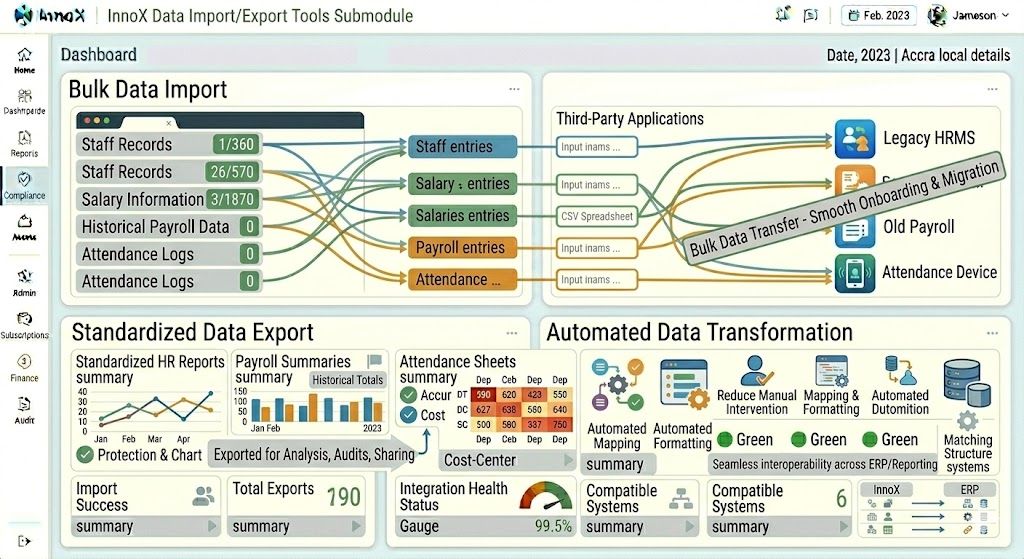
This submodule simplifies bulk transfer of HR data between the InnoX HRMS and other systems. It ensures smooth onboarding, migration, or reporting activities.

Migrate. Report. Share. Zero Manual Data Entry.

Moving data into a new HRMS or sharing it with finance teams shouldn't require weeks of spreadsheet work. This sub-module makes bulk data transfer fast, accurate, and painless. Import staff records, salary information, historical payroll, and attendance logs from legacy systems or spreadsheets in minutes , not days. Export standardized HR reports, payroll summaries, and attendance sheets for audits, analysis, or cross-department sharing. Automated data mapping eliminates manual reformatting. The result is smooth system migrations, error-free reporting, and HR teams freed from tedious data entry.

Migrate from Legacy Systems in Minutes, Not Weeks

Bulk import large volumes of staff records, salary information, historical payroll data, and attendance logs from spreadsheets, legacy HRMS platforms, or other systems. No manual rekeying. No data entry marathons. HR teams can onboard to InnoX HRMS rapidly, with complete historical data intact and ready for reporting from day one.

Performance illustration
Bulk Data Import

Bulk Data Import

HR teams can import large volumes of staff records, salary information, historical payroll data, and attendance logs from legacy systems, spreadsheets, or other platforms. No manual rekeying. No data entry marathons. Complete historical data ready for reporting from day one.

  • Staff records import : Bulk upload employee profiles, job details, contact information, and organizational assignments
  • Salary & payroll history : Import compensation data, historical payroll runs, tax information, and payment records
  • Attendance logs : Bulk load historical attendance data, clock-in/out records, and leave balances from legacy systems

Standardized Data Export

Standardized Data Export

The system allows export of standardized HR reports, payroll summaries, and attendance sheets for internal analysis, audits, or sharing with finance and management teams. One-click exports. Consistent formatting. Ready for stakeholders the moment they need them.

  • HR reports export : Standardized employee lists, headcount reports, organizational charts, and demographic summaries
  • Payroll summaries : Export payroll totals, tax liabilities, deduction summaries, and cost center allocations
  • Attendance sheets : Export attendance logs, timesheets, absence records, and leave balance summaries for audits or analysis

Discover More with InnoX

Stop manual data entry and disconnected systems. The InnoX Integration Module seamlessly connects your HRMS with biometric devices (fingerprint, facial, iris), ERPs (SAP, Oracle, Dynamics, Odoo), accounting tools, and custom applications. Real-time attendance sync. Automated payroll journals. Secure RESTful APIs. Bulk import/export tools. Your entire enterprise unified.

Automated Data Transformation

Automated Data Transformation

The sub module supports automated mapping and formatting of imported or exported data to match the structure required by other ERP or reporting systems, reducing manual intervention and errors. Upload in any format the system transforms it. Export the system formats for your target system.

  • Smart data mapping : Automatically map source fields to target fields based on configurable rules and templates
  • Format transformation : Convert date formats, number formats, text encoding, and structure to match target system requirements
  • Error prevention : Validation rules flag mismatches before import/export, preventing formatting errors from reaching production
Capabilities

Features Of Data Import/Export Tools

Everything you need to simplify bulk transfer of HR data between InnoX HRMS and other systems, enabling smooth onboarding, migration, and reporting activities.

Bulk Data Import

Import large volumes of staff records, salary data, historical payroll, and attendance logs from legacy systems or spreadsheets.

Standardized Data Export

Export standardized HR reports, payroll summaries, and attendance sheets for audits or sharing with finance teams.

Automated Data Transformation

Automated mapping and formatting of imported/exported data to match target system structures, reducing manual errors.

Template Library

Pre-built import/export templates for common scenarios like employee onboarding, monthly payroll, and attendance reconciliation.

Data Validation Before Import

Validates imported data against system rules, flagging errors before records are committed to the database.

Scheduled Exports

Configure automated export schedules for recurring reporting needs (daily, weekly, monthly).

Import/Export Logging

Complete audit trail of all import/export activities including timestamp, user, record count, and success/failure status.

Error Reporting & Correction

Detailed error reports with row-level validation failures and suggested corrections for failed imports.

Multi-Platform

Responsive For Both Desktop and Mobile

Access your data import export tools from anywhere, on any device. Our platform adapts seamlessly to desktop, tablet, and mobile screens.

Desktop Website Preview
Mobile Website Preview

Frequently asked questions

Explore answers to the most common questions from our trusted partners and clients.

Yes. Administrators can create and save custom mapping rules for any import or export scenario. A monthly export to the finance system might need specific account codes appended to each salary record. An import from a contractor's time tracking system might need date formats and project codes transformed. Once configured, these custom transformations apply automatically to every scheduled or on demand data transfer. You build the rule once, and the system applies it forever.

Experience the Difference for Yourself!

  • Explore all features and decide if it’s right for you
  • Upgrade your workflow and launch faster than before
  • Join our community and start learning as you build
InnoX
Innorik
Enterprise
Two people moving forward together through a sunlit park