



InnoX
Initiative
INITIATIVE AND ASSIGNMENT MANAGEMENT

Initiatives Across the Organization

This InnoX submodule ensures that strategy transforms into action, and action transforms into results, with complete visibility into who is doing what and when. It focuses on creating, structuring, and distributing work initiatives across all levels of the organization.

Better Work. Clearer Ownership. Stronger Results.

When work initiatives are clearly defined, logically structured, and assigned with unambiguous ownership, organizations move from chaotic activity to purposeful execution. Work no longer falls through the cracks. Teams no longer wonder who is responsible for what. Managers no longer chase status updates. This submodule transforms how work gets done by creating a structured framework where every initiative from corporate strategy to individual task has a clear owner, defined expectations, and visible progress. This makes organizations replace fragmented, unclear assignment processes with a disciplined, transparent approach to initiative and assignment management

Staff-Level Individual Assignments

Assign specific, measurable responsibilities to individual employees that form the foundation for performance evaluation and personal accountability. Staff assignments capture descriptions, outcomes, deadlines, priorities, and resources.

Performance illustration
Initiative Cascade Viewer

Initiative Cascade Viewer

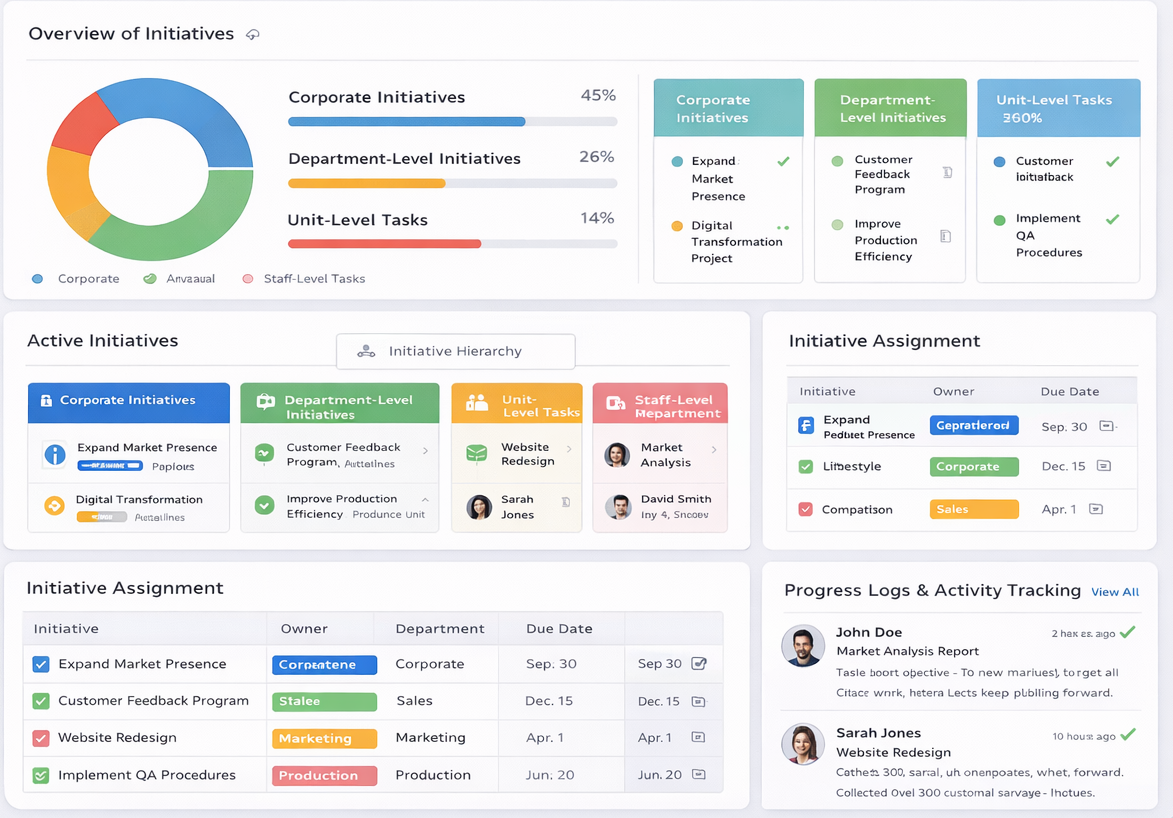
An interactive view that displays how initiatives flow from corporate level down through departments, units, and individual staff members. Users can expand or collapse any branch to explore the full initiative hierarchy. Clicking any initiative reveals its parent initiative, child initiatives, current status, assigned owner, and completion progress. This visual representation makes accountability transparent and helps identify gaps where initiatives have not been properly cascaded to lower levels.

  • Corporate initiatives appear at the root level, with colour-coded branches showing how each one cascades into department, unit, and staff-level actions.
  • Hover over any initiative to see a summary including owner, due date, current status, and percentage complete without leaving the main view.
  • The system automatically highlights orphaned initiatives that have no parent or missing child connections, enabling managers to close accountability gaps immediately.

Pending Acknowledgment Queue

Pending Acknowledgment Queue

A real-time task panel showing all staff-level assignments that have been created but not yet acknowledged by the assigned employees. Managers can see who has accepted their responsibilities and who still needs to respond. This panel prevents assignments from falling through the cracks and gives managers early visibility into potential resistance or confusion before deadlines approach.

  • Each pending assignment displays employee name, assignment title, date assigned, days pending, and priority level for at-a-glance awareness.
  • Managers can send automated reminder notifications directly from the panel to employees who have not yet acknowledged their assignments.
  • The panel highlights high-priority assignments that remain unacknowledged close to their start dates, enabling proactive intervention before delays occur.

Discover More with InnoX

The InnoX Performance Management module enables continuous, transparent, and structured evaluation of employees to drive productivity, professional development, and alignment with organizational objectives. Built to support the operational demands of various roles including technical, field, and administrative, the module ensures that every employee's contribution is measured fairly and consistently.

Workload Distribution Monitor

Workload Distribution Monitor

A visual analytics panel that shows how initiatives and assignments are distributed across teams and individual employees. Managers can see who is overloaded, who has available capacity, and which teams are consistently meeting deadlines versus those falling behind. This intelligence enables proactive workload balancing, preventing burnout on high-performing teams while ensuring underutilized resources are engaged productively.

  • Bar charts display the number of active assignments per employee, with colour-coded thresholds indicating overload (red), balanced (green), or underutilized (yellow) status.
  • Department-level summaries show total initiatives, completion rates, and average time to completion, enabling managers to compare performance across teams.
  • Click any employee name to view their full assignment list, upcoming deadlines, and historical completion rates for deeper workload analysis.
Capabilities

Features Of Initiative & Assignment Management

Everything you need to create, structure, and distribute work initiatives across every level of your organization with clear ownership and full accountability.

Corporate Initiatives Management

Allows creation of initiatives at any level, capturing strategic alignment, priority, timeline, and success criteria.

Unit-Level Initiatives

Breaks corporate initiatives into actionable tasks for teams; bridges high‑level strategy with daily execution.

Staff-Level Initiatives

Assigns specific responsibilities to employees as a basis for evaluation; each person knows their ownership and success metrics.

Initiative Hierarchy & Cascading

Links initiatives across levels (corporate → department → unit → staff); lower‑level progress rolls up to parent initiatives.

Initiative Assignment (All Levels)

Assigns initiatives to departments, sections, units, and staff with clear ownership; every initiative has an owner.

Role-Based Assignment Controls

Ensures only authorized personnel can assign or modify initiatives; prevents unauthorized changes and maintains data integrity.

Staff Sign-Off on Assignments

Requires task acknowledgment for clarity/accountability; eliminates "I didn't know."

Multi-Level Assignment Dashboard

Executives see strategic initiatives; department heads see team portfolios; employees see personal tasks right view for every role.

Multi-Platform

Responsive For Both Desktop and Mobile

Access your initiative and assignment management from anywhere, on any device. Our platform adapts seamlessly to desktop, tablet, and mobile screens.

Desktop Website Preview
Mobile Website Preview

Frequently asked questions

Explore answers to the most common questions from our trusted partners and clients.

InnoX is cloud-native and fully accessible via desktop, web browser or mobile device. Features for distributed teams include: Real-time assignment notifications via email, SMS or in-app alerts Mobile-friendly interface for field staff to view and sign off on assignments Offline mode (assignments sync when connectivity returns) Comment and attachment capabilities for asynchronous collaboration Your control room, field crews, and remote engineers all stay on the same page.

Experience the Difference for Yourself!

  • Explore all features and decide if it’s right for you
  • Upgrade your workflow and launch faster than before
  • Join our community and start learning as you build
InnoX
Innorik
Enterprise
Two people moving forward together through a sunlit park